Shabti 0.8 is here!
We've been hard at work making changes and implementing a whole load of new features, and the timelines have been such that we've rolled what we originally had planned for several releases into one big one. We're very excited about how it's looking and we hope you will agree!
If you just want to download it and get started, click here!
New Name: Shabti
First up, we're renaming the project! From this release onwards it will be known as Shabti. We see AI as an assistant to allow you to complete tasks more efficiently, in the case of our application this is achieved by processing large collections of data, giving you the highlights relevant to your needs. and answering queries using those highlights. Shabti were figurines the ancient Egyptians placed in tombs to act as minions or servants to the deceased to help them complete tasks in the afterlife, so we feel the name is a good fit.
New install process

We weren't very happy with the install script for many reasons, so we've completely overhauled the experience of setting up your Shabti instance. The text-based adventure approach was getting unwieldy, and people were running into issues when their Python version didn't match the one we used for development. To this end, we've made the whole of Shabti run in Docker ensuring that the correct dependencies are shipped, and you can configure the options using a web interface.
Just download the executable for your OS, run it, and visit the web UI address in your browser, many terminals will allow you to click the link directly.

We currently don't have code signing configured for MacOS so you'll have to bypass Gatekeeper protections if you want to try Shabti on Mac. We are working on getting it set up, so please be patient!
Windows Smartscreen
On Windows we do have code signing configured, however, at the time of writing, the executable is still being blocked by SmartScreen. We would really appreciate it if you could allow our app, as this will increase our trust with Microsoft and allow future releases signed by us to avoid being blocked.

If Windows blocks execution, please click on "More info" and it should confirm that the executable is signed by InfoSec Innovations, LLC. If this is not the case, please do not proceed as it is not in fact signed by us. Assuming the executable is correctly signed, please go ahead and click "Run anyway" to enjoy Shabti and help us out at the same time!

Note that if you do not get the popup, that means the executable has been approve by SmartScreen already and you're good to go!
RBAC

As a company involved in the cybersecurity scene, creating a secure AI experience is one of our top goals with Shabti. To this end, we've implemented role-based access controls (RBAC) that should allow you to define who can interact with data in your Shabti instance, and how they can do so.
We chose Keycloak as the framework to manage authentication and authorization as it offers a lot of the functionality we were looking for out of the box and it fits right into the existing stack. You can handle user accounts directly in Keycloak, but a key strength of this framework is that you can connect to your existing identity providers such as LDAP, Entra ID, Okta and many many others (any OAuth2 provider will work, as well as some other protocols) for a smooth integration with your users' accounts.
We've added several roles to cover some scenarios that we think will be common, but you can also use the Keycloak admin UI to customize roles and permissions as much as you need. There's also a demo configuration which creates several test users so you can see for yourself how it works, but do not use this in a production environment as it is not secure!
As this is the first iteration of our RBAC implementation and Shabti is till in alpha development stage, while we have done our best to implement a robust security system, we would urge you to exercise caution as the application is provided as-is. We would love to know about it if you did uncover any potential flaws, security or otherwise, at any level in the project!
In addition to the access controls, when security features are enabled, you get TLS encryption (HTTPS) to protect communications. At the moment we're using self-signed certificates generated during the installation process, so you will have to dismiss browser warnings about the certificates.
If you just want a Shabti experience that you can run locally without the security features that's fine too, we allow you to run it as before with no access controls.
REST API

We've had some requests for this feature, and it's something we wanted to do anyway, now it's ready for you to try out. We've split the original app into 2 parts: a REST API and a web interface. This means that you can now use the API without the web interface if you want to build your own frontend or integrate Shabti into an existing tech stack. You can now perform all the actions through HTTP requests, and we have implemented Python and Nodejs clients to streamline the process in those languages. We don't yet have official documentation on using the REST API, so you will need to check out the routes using the /docs route and/or look directly at the source code of the clients.
New document types
We've added Apache Tika to the Shabti stack which is a document converter that can take many different file types as an input and process them into plain text which can be used for RAG (Retrieval-Augmented Generation) systems such as Shabti. This means that many common document types can now be ingested as well as images which are processed through OCR.
We have also implemented a zip file loader which will extract the contents of the archive and ingest all of them. As we don't yet have support for ingesting directories through the web UI, you can zip a directory and use that to bypass this limitation.
New model runner
We've switched from Ollama to Llama.cpp as the backend for running LLM models.
This brings several improvements:
Prompting is slightly faster.
Vectorizing documents (which is the process which enables finding documents matching the query) can now be handled by the same model runner as prompting.
Significant reduction in Docker image size.
There's a single Shabti configuration regardless of which type of hardware acceleration is used, the only part of the stack which needs configuring is the model runner.
Much less complexity building the Docker image.
CLI
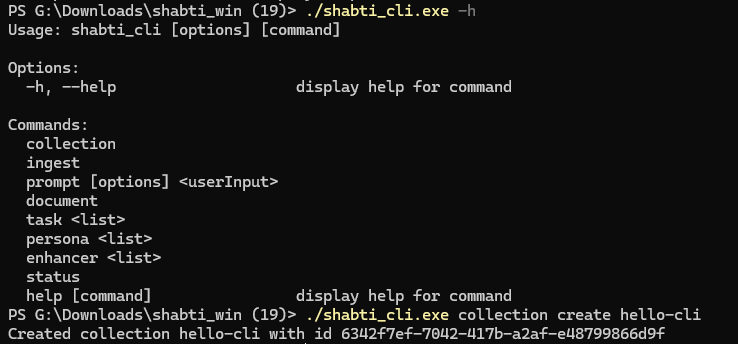
We've spruced up the command line with more functionality and new syntax, and just like the installer, the requirement to have Python installed has been removed. If using Access Controls, the CLI operates using an admin account, so be careful with it! We may implement login in the future to allow people to interact with it via their user accounts, please let us know if you would use that feature. Run the Shabti CLI executable with -h to view the available commands.
Logging

We've implemented logging for many of the key actions in Shabti. You can choose to enable logging and set the directory for the log file in the installer. The logs are in JSON format, each line in the file is a JSON object. We currently don't have any options for managing the contents of the log file, we advise using a utility such as Linux's logrotate to handle log file maintenance. We would love to hear about any additional options you wish to see with logging, so far we just have it enabled or disabled, but we are looking to add more granular settings and it would be helpful to know about specific use cases.
Improvements to accessing a Shabti instance remotely
We have had several GitHub issues relating to accessing a Shabti instance via the network instead of using the local machine that's running it. We're working on improving this experience, the web configurator UI now has more options that allow you to expose the API and web client in a way that suits your needs. Please let us know if you have a use case that isn't covered by the available options.
What Next?
We're becoming more satisfied with the scaffolding around the Shabti tech stack, which means we will be able to shift more attention to improving the core functionality itself, here are some areas we think currently need attention that we will be working on in the next releases:
Retrieval results
While it already shows a lot of promise, the document retrieval system isn't where we would like it to be just yet. We're looking to refine the accuracy of the search results to be more relevant to the user's query: experimenting with chunking strategies and embedding models is one of our ongoing tasks. As well as improving the results from the current method, we would like to add multi-collection queries so you can cross-reference several collections.
Model selection
We've currently hardcoded in the language models we feel give the best hardware requirements to performance ratios, but our plan has always been to let you select the models which best suit your use case. We will add selectors for the embeddings and prompting models to enable you to get the best out of whichever hardware you're using.
New prompting configurations
We currently offer a very small selection of personas and prompt options to demonstrate how the feature would work, but most of these are placeholders while we build the core functionality. We plan to flesh these out a good deal in the near future!


Comments